Shadow Dungeon Patch 1.0.1 Notes
The first post-launch bug-fix build, published the day after 1.0.
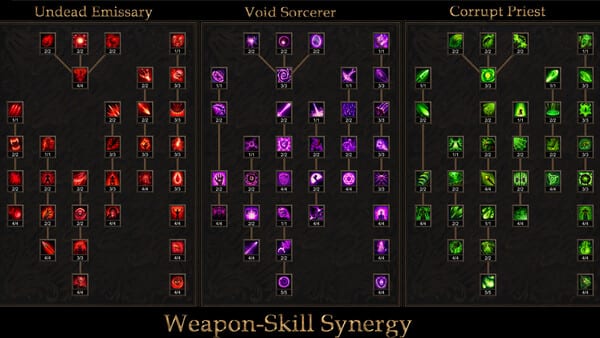
Shadow Dungeon version 1.0.1 is the first patch after the August 26, 2026 Steam launch. OO Cat published it on August 27, 2026 under the Steam news title 1.0.1-2026.8.27 Bug Fix. It does not add a new class, a new chapter, or a seasonal reset. It repairs launch-day problems that blocked controllers, experience, talent respecs, health readouts, and Treasure Sprite automation, and it adds more display resolutions.
If you bought the game on day one, treat 1.0.1 as required. Several of the listed bugs would make a fresh campaign or a controller session unplayable. The Updates Hub remains the index for later notes; this page is the full 1.0.1 changelog with player-facing context. For input and display options that the patch touches, see Controls and Settings. For fairy behavior, see Treasure Sprites.
Official changelog
The Steam post lists the following changes. The transformation-skill line appeared twice in the news text; it is one fix, not two separate features.
- Added more screen resolutions
- Fixed frame drops when playing with a controller
- Fixed controllers not being recognized
- Fixed transformation skills not allowing points to be allocated correctly
- Fixed experience not being obtainable
- Increased fairy movement speed
- Fixed monster element types not displaying
- Fixed health UI not displaying values
- Fixed fairy auto salvage
- Fixed pinnacle talents not being cleared correctly after respec
- Fixed the one-click backpack sorting hotkey not taking effect
That is the complete official list. This wiki does not invent extra bullets, hidden keybinds, or unnamed maps that were not in the post.
Display and health UI
More screen resolutions matters on ultrawide monitors, Steam Deck-class panels, and odd laptop ratios. The 1.0 announcement already promised Steam Deck map scale-downs and larger fonts; 1.0.1 extends the PC display list so more of those layouts can pick a native mode instead of stretching.
Health UI not displaying values is a readability bug, not a combat-formula change. If your bar moved but numbers stayed blank, that is the launch defect this build targets. Pair it with the monster-element display fix: element types that failed to show on enemies are a UI issue, not a new damage table. After 1.0.1 you should be able to read both your own health figures and enemy element labels when the game intends to show them.
Controller recognition and frame drops
Two controller lines sit next to each other on purpose. Controllers not being recognized is a device-detection failure: the pad never binds. Frame drops when playing with a controller is a performance failure after the pad already works. The 1.0 notes already described automatic target acquisition, automatic attacks, per-skill intelligent targeting, L1/R1 page switching on inventory, storage, and talent panels, one-button buff potions, and a customizable cursor. None of that is useful if Steam never sees the pad or if combat hitching makes auto-attack unusable.
If you play on Steam Deck, 1.0 already shipped dedicated button configs (context-sensitive X for drop, sell, store, or max skill; A for +1 talent point; X to max a skill; Y to max a skill and its sub-skills). 1.0.1 does not rewrite that layout; it tries to make the session stable enough to use it. After updating, reconnect the pad from Steam’s controller settings if Windows still hides the device.
Experience, transformation skills, and pinnacle talents
Experience not being obtainable is a progression stopper. Monster levels and item drops are tied to the map, not the player, per the 1.0 announcement, but you still need XP to reach the campaign’s intended band of about level 99–100 at story end. If kills awarded no experience, this patch is the documented repair. Continue the story maps rather than inventing a farm spot this wiki will not name.
Transformation skills not allowing points to be allocated correctly is a talent-investment bug on transformation skills as a category. OO Cat did not publish skill names in the patch, and this page will not invent them. If a transformation node refused points, retry after 1.0.1.
Pinnacle talents not being cleared correctly after respec is a leftover-state bug. Shadow Dungeon lets you rebuild talent investment; unlimited late-game skill points only help if a respec actually clears pinnacle talents. If old pinnacle effects lingered after a reset, that is the defect this line addresses. Re-open the talent UI after a respec and confirm those nodes are gone before you spend points again. For tree structure, use the Talent Trees guide rather than treating 1.0.1 as a balance patch.
Treasure Sprites: speed and auto salvage
The 1.0 announcement introduced Treasure Sprites (fairies) that pick up equipment, salvage unwanted gear into gold, carry unique effects, and pass through walls to retrieve loot stuck outside collision. Patch 1.0.1 increased fairy movement speed and fixed fairy auto salvage. Those are quality-of-life repairs, not a new sprite roster. If auto salvage silently failed at launch, update before you blame filter settings. Details stay on the Treasure Sprites page.
Backpack sorting hotkey
One-click backpack sorting hotkey not taking effect means the bound sort command did nothing. The patch does not name the key, and this wiki will not invent a default bind. After 1.0.1, confirm the command in your input settings. Extra inventory pages still come from quests; warehouse pages remain unlimited. Sorting is convenience, not extra stash space.
What 1.0.1 does not change
1.0.1 is still a single-player ARPG. There is no co-op, no microtransactions, and no seasonal reset. The campaign is still seven chapters and 160 maps. Greater Rifts still unlock after the main story with Normal, Master, Nightmare, and Inferno. The store still lists Mystic Dungeon Challenges as a separate named feature; this patch does not merge those names. Future free content (Assassin, Engineer, Barbarian, Warlock, Mercenary, Tower Defense, Rune System, Transmutation and Crafting) is still announced, not shipped here.
The intro price remains $8.99 USD (10% off $9.99 through September 9, 2026) on Steam app 4423580. Reviews at the time of this writing sit at Very Positive, 88% of 190.
After you update
Install 1.0.1 from Steam, then sanity-check: a controller is detected, a kill grants experience, health numbers render, a fairy moves faster and auto-salvages when that option is on, a respec clears pinnacle talents, and backpack sort fires. If you skipped the launch write-up, read 1.0 Launch Content next so combat, rifts, and sprites match the systems this hotfix assumes.
Frequently Asked Questions
Quick answers to the most common questions about Shadow Dungeon.
When did Shadow Dungeon 1.0.1 ship?
OO Cat released 1.0.1 on August 27, 2026, one day after the August 26, 2026 1.0 launch, as Steam news titled 1.0.1-2026.8.27 Bug Fix.
Does 1.0.1 add new classes or Greater Rift difficulties?
No. It is a bug-fix build: resolutions, controllers, transformation skill points, experience, fairies, element and health UI, pinnacle talent respec, and backpack sorting. Greater Rifts remain Normal, Master, Nightmare, and Inferno from the 1.0 announcement.
I play with a controller. Which 1.0.1 lines matter most?
Controllers not being recognized and frame drops when playing with a controller. 1.0 already documented auto-target, auto-attack, L1/R1 paging, and Steam Deck button configs; 1.0.1 is meant to make those usable.
Did 1.0.1 change Treasure Sprite unique effects?
The patch only increased fairy movement speed and fixed auto salvage. Unique sprite effects and wall-clip pickup still come from the 1.0 Treasure Sprites announcement, not from new 1.0.1 effect lists.
Why did my experience stop dropping before the patch?
The official notes include a fix for experience not being obtainable. That is a bug, not a map-level design change. Monster level and item drops stay tied to the map, not the player, as stated in the 1.0 announcement.
Where should I look after reading these notes?
Use the Updates Hub for the archive, Controls and Settings for input and display, and Treasure Sprites for fairy behavior. The 1.0 Launch Content page covers systems this hotfix did not redesign.