Shadow Dungeon Combat and Controls Deep Dive
Mouse movement, controller auto-combat, potions, and the DPS Tester — without invented keybinds.
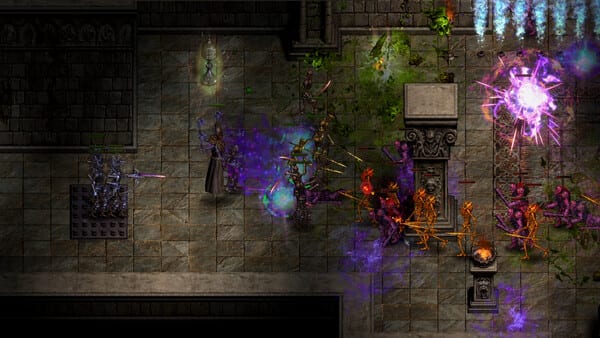
Shadow Dungeon is a real-time action RPG. You fight 200+ monster types and 60+ bosses across 160 maps, then continue into post-story Greater Rifts. Combat is always solo: no co-op. This deep dive uses only controls and combat features OO Cat published for 1.0 and 1.0.1. It does not invent keyboard defaults, skill names, or boss telegraphs.
If you are still picking a class, start with Getting Started. For display, paging, and Steam Deck layout detail, keep Controls and Settings open beside this page. Launch systems that surround a fight (affixes, sprites, Paragon) are summarized in 1.0 Launch Content.
Mouse movement and the battlefield
The 1.0 gameplay section lists mouse movement as a first-class improvement. On PC you steer and aim with the mouse rather than treating the dungeon as a grid. That matters in the official environments — tight dungeons, temples, deserts, haunted ruins, realms beyond reality, hell — where projectiles and packs share the floor with Treasure Sprites collecting loot through walls.
Cursor size is customizable. If auto-target on a pad feels better than a tiny cursor on a 4K panel, enlarge the cursor instead of guessing a sensitivity that was never posted. Patch 1.0.1 added more screen resolutions, which is a combat issue when black bars or stretch change your hit feedback.
Controller: auto-target, auto-attack, potions, paging
Controller support in 1.0 is explicit:
- Automatic target acquisition
- Automatic attacks
- Each skill has its own intelligent targeting behavior
- Use all buff potions with a single button press
- L1/R1 (and mouse) page switching on inventory, storage, talent tree, and other paged UIs
Auto-target plus auto-attack is how a dual-blade Holy Warrior or a summoning Necromancer stays in motion without a keyboard attack key this wiki will not invent. Intelligent per-skill targeting is why a precision Archer and an elemental Sorcerer can share one pad layout without identical aim rules. One-button buff potions matches the store’s potion and elixir layer (buff potions and rare permanent elixirs; 17 blessing shrines remain world objects, not the potion hotkey).
1.0.1 then fixed controllers not being recognized and frame drops when playing with a controller. If auto-attack hitching made targeting feel random, update before you remap. Performance work in 1.0 already cut particles by 60% and claimed about 40% better FPS; controller hitching was a separate leftover.
Steam Deck dedicated buttons
Steam Deck configs make one physical button mean different things by panel:
- Inventory open: X drops an item
- Shop open: X sells
- Storage open: X sends an item to storage
- Skill panel open: X fully upgrades the selected skill
When adding skill points: A adds 1 point, X maxes the skill, Y maxes the skill and all of its sub-skills. Fonts were increased; many maps were scaled down and some props removed for frame rate. Those Deck notes are combat-adjacent because a dropped FPS on Inferno rifts is a dodge problem, not only a graphics problem.
Four class playstyles (store, not invented skills)
Launch classes, as the store frames them:
- Sorcerer — elemental magic specialist
- Holy Warrior — dual-blade melee
- Archer — precision damage from range
- Necromancer — summons
This page will not name talent nodes. Each class still has three trees (twelve total) and access to 370+ skills, with unlimited late-game skill points so hybrids are intended. Weapons can grant auras, trap launchers, skill conversions, projectile-blocking shields, combo launchers, and summoned-creature accessories or attacks. Those granted skills are part of combat even when they come from loot rather than a tree. Sets (15 per class) often alter skill forms. Evaluate that on Builds and the Tier List, not here.
Future Assassin, Engineer, Barbarian, and Warlock are announced and free; they are not in 1.0 combat.
DPS Tester
The DPS Tester is not only a punching bag. Officially it can attack the player and trigger counterattack skills that activate when the player is hit. Use it to confirm on-hit retaliation, shields that block projectiles, and auras that need you to take a swing — especially after a respec or a new weapon-granted skill. It does not replace Greater Rift testing, where higher difficulties add affix chance.
Resources, loot, and UI during a fight
Health UI values failed to display for some players until 1.0.1; monster element types also failed to display. Those are readability fixes. Lighting in 1.0 dimmed torches, reduced bright/dark contrast, and lowered ground contrast to cut eye strain during long real-time sessions.
Treasure Sprites pick up and salvage so you can keep attacking. Auto salvage was fixed in 1.0.1; fairy movement speed increased. Do not stand in a pack waiting on a stuck legendary if the sprite can clip the wall.
Paged inventory during combat uses L1/R1. Extra pages still come from quests; warehouse pages are unlimited. The one-click backpack sorting hotkey did nothing until 1.0.1; the patch does not name the key.
Experience is part of combat outcome: 1.0.1 fixed experience not being obtainable. Map-tied XP and drops still mean the map sets the band, not your Paragon. After level 100, Paragon enhances attributes; it does not change the real-time rules above.
Practice path
New characters: learn mouse movement or pad auto-combat in early maps, then confirm potion-all and paging. Before the Demon Lord, visit the DPS Tester if you rely on on-hit skills. After the story, take the same habits into Greater Rifts (and keep Mystic Dungeon as a separately documented store name). For the hotfix list that made pads and XP trustworthy, read Patch 1.0.1.
Frequently Asked Questions
Quick answers to the most common questions about Shadow Dungeon.
Does Shadow Dungeon use turn-based combat?
No. It is a real-time action RPG with mouse movement on PC and controller auto-target plus auto-attack.
What controller features did 1.0 actually document?
Automatic target acquisition, automatic attacks, per-skill intelligent targeting, one-button use of all buff potions, L1/R1 page switching, and Steam Deck context-sensitive X plus A/X/Y skill-point shortcuts.
What is the DPS Tester for?
It can attack you and trigger counterattack skills that fire when you are hit, in addition to letting you measure outgoing damage.
Will this guide list default keyboard binds?
No. OO Cat did not publish a full keyboard table in the 1.0 or 1.0.1 notes. This page only uses documented mouse, controller, and Steam Deck controls.
How do the four classes play in combat?
Store framing only: Sorcerer is elemental, Holy Warrior is dual blades, Archer is precision, Necromancer is summons. Skill names are not invented here.
My controller was ignored or hitching at launch. Is that expected?
Those were listed 1.0.1 bugs: controllers not recognized, and frame drops when playing with a controller. Update to 1.0.1 before diagnosing hardware.